This is a short tutorial to show you can log Message Headers from Apache Camel in a simple way
Camel Headers in a nushell
Messages are the entities you can use to communicate between systems through messaging channels. Each message flows in one direction from a sender to a receiver. Messages have a body (a payload), headers, and optional attachments.
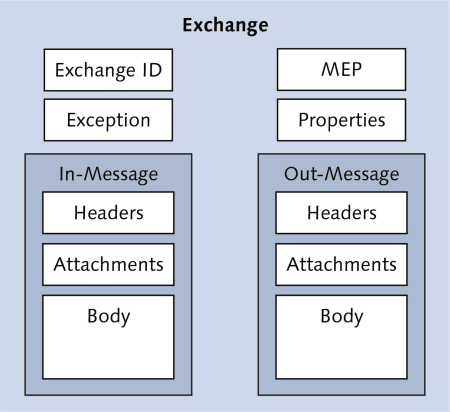
Usually Headers are identifiers, hints about content encoding, authentication info, and so on. Headers are name-value pairs; the name is a unique, case-insensitive string, and the value is of type java.lang.Object.
It follows that Camel does not impose any constraint on the type of the headers. Headers are stored as a map within the
message.
Logging the Header
The following example RouteBuilder Class shows you how you can log Camel Headers through the Log component:
public class MyRouteBuilder extends RouteBuilder {


    @Override
    public void configure() throws Exception {

        // Kafka Producer using Message key
        from("file:src/data?noop=true")
        .setHeader("RandomNumber").simple("${random(1,100)}")
        .to("direct:b");

        // Kafka Consumer
        from("direct:b")
                .log(LoggingLevel.INFO, "Message received : ${body}")
                .log(LoggingLevel.INFO, "${in.headers.RandomNumber}");
    }

}
In many cases, you can check headers to determine the flow of your Camel Route. Here is an example:
  from("direct:header-start").setHeader("foo", simple("{{foo}}")).choice().when(simple("${header.foo} == 'bar'"))
                        .to("mock:header-ok").otherwise().to("mock:ko");
Finally, if you are using XML to log headers, the following snippet works as well:
<log message="random number: ${header[RandomNumber]}"/>
Found the article helpful? if so please follow us on Socials


