When building Spring Boot applications, it’s common to require preloading data into the database. Two approaches to achieve this are using the import.sql and data.sql files. In this tutorial, we’ll explore these methods and highlight their differences.
How to preload data in Spring Boot applications
There are several strategies to preload data in Spring Boot applications for development and test purposes. In this article we show how to do it using the CommandLineRunner interface: SpringBoot JPA example with H2 DB
On the other hand, if you want to insert some data to test your application you can also rely on the default SQL script which Spring Boot can read and execute at start up. In this article we will go through all the available options.
How to use the import.sql File
The import.sql file is a special file recognized by Spring Boot when using embedded databases like H2 or HSQLDB. It allows for automatic execution of SQL statements during application startup. To preload data using this approach, follow these steps:
- Create an
import.sqlfile in thesrc/main/resourcesdirectory. - Add SQL statements to the
import.sqlfile. For example:
-- Create a table
CREATE TABLE person (
    id INT PRIMARY KEY AUTO_INCREMENT,
    name VARCHAR(255),
    surname VARCHAR(255),
    age INT
);

-- Insert initial data
INSERT INTO person (name, surname, age) VALUES ('John', 'Doe', 25);
INSERT INTO person (name, surname, age) VALUES ('Jane', 'Smith', 30);
- Ensure the
import.sqlfile is located in the classpath so that Spring Boot can detect and execute it.
That’s it! When your Spring Boot application starts up, it will automatically execute the statements defined in the import.sql file. This approach is particularly useful for embedded databases, as it allows for schema creation and data insertion without additional configuration.
In most cases, when developing applications you would prefer to have Hibernate to perform automatic Table creation and use the import.sql only to preload data. In this case, you need to make sure that you include the following Hibernate property otherwise the import.sql will fail.
spring.jpa.hibernate.ddl-auto=create
Here is a snapshot of a Project which uses import.sql and automatic Table creation:
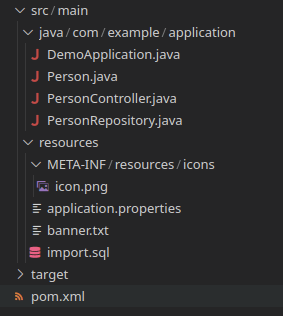
Source code for this example: https://github.com/fmarchioni/masterspringboot/tree/master/jdbc/sql-scripts
How to use the data.sql File
Unlike the import.sql file, the data.sql file is recognized by Spring Boot for all types of databases, including embedded and external databases like MySQL or PostgreSQL. It allows you to insert initial data into the database after the schema is created. Here’s how you can use the data.sql approach:
- Create a
data.sqlfile in thesrc/main/resourcesdirectory. - Add SQL statements to the
data.sqlfile to insert the desired initial data. For example:
-- Insert initial data
INSERT INTO person (name, surname, age) VALUES ('John', 'Doe', 25);
INSERT INTO person (name, surname, age) VALUES ('Jane', 'Smith', 30);
- Ensure the
data.sqlfile is located in the classpath.
With these steps completed, the statements in the data.sql file will be executed after the database schema is created during application startup.
With regards to schema creation there’s a caveat here. You have mainly two options:
Option #1: Add schema.sql file
Include also a schema.sql file . Spring Boot uses this file to create the initial tables that you need for your application:
CREATE TABLE person (
    id INT PRIMARY KEY AUTO_INCREMENT,
    name VARCHAR(255),
    surname VARCHAR(255),
    age INT
);
Then, make sure that you have set to ‘none’ the Schema creation. Otherwise Hibernate will re-create your schema after completing the schema.sql/import.sql round:
spring.jpa.hibernate.ddl-auto=none
Option #2: Defer datasource initialization
If you dont’ want to use the schema.sql script and, instead rely on the automatic Table creation, then you need to defer the execution of the data.sql until Tables have been created:
spring.jpa.hibernate.ddl-auto=create
spring.jpa.defer-datasource-initialization=true
Key Differences between import.sql and data.sql
Now that we’ve explored both approaches, let’s highlight the key differences between using import.sql and data.sql:
- Database Compatibility:
import.sqlis specific to embedded databases like H2 or HSQLDB, whiledata.sqlworks with all types of databases, including embedded and external databases. - Timing of Execution:
import.sqlis executed during application startup before any other initialization occurs. In contrast,data.sqlis executed after the database schema is created. - Schema Creation:
import.sqlcan be used to define schema creation and initialization statements, including data insertion, for embedded databases.data.sqlassumes the schema is already created and focuses solely on data insertion.
By understanding these differences, you can choose the appropriate approach based on your database requirements and data preloading needs in Spring Boot applications.
Conclusion
In this tutorial, we explored two approaches for preloading data in Spring Boot applications: using import.sql and data.sql files. The import.sql file is specific to embedded databases and allows for schema creation and data insertion during application startup. On the other hand, the data.sql file works with all types of databases and focuses on data insertion after schema creation. By leveraging these approaches, you can efficiently preload data into your Spring Boot application,


