Red Hat Fuse on OpenShift lets you to deploy Fuse applications on the top of OpenShift Container Platform. In this tutorial we will cover how to deploy a Fuse application on OpenShift using Code Ready Studio to quickly generate an example application.
Pre-requisites:
You need to install the Fuse Imagestreams and Templates on the OpenShift 4.x server. ImageStrams is an OpenShift API object that represents single virtual view of related images.
You can refer to script for installing image streams and templates: https://github.com/rahmed-rh/fuse_on_OCP_7.5/blob/master/scripts/install_fis_7.5.sh
(Please note that to install Fuse Imagestreams and Templates, you must have the administrator role for the OpenShift project.)
Creating your Fuse 7 application
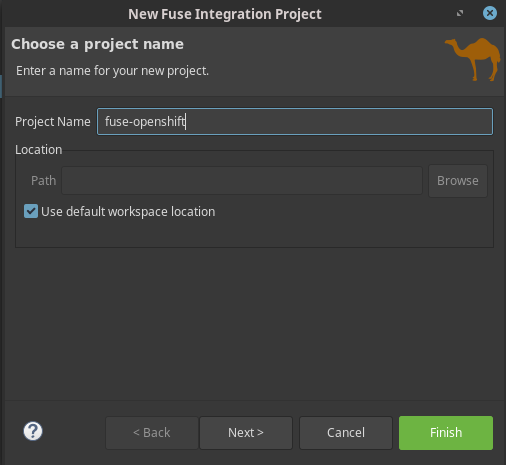
Start Code Ready Studio and choose to create a new Fuse Integration application:
Next, select the target Environment.
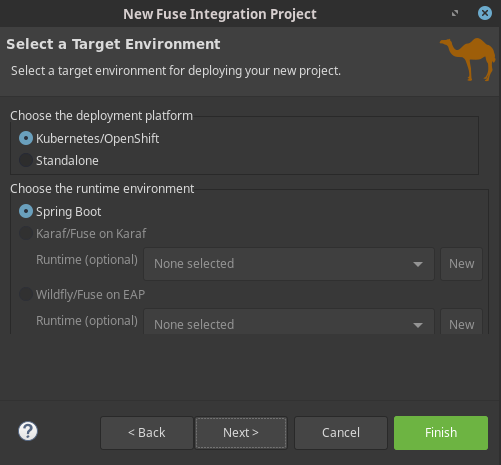
As we want to deploy the application on OpenShift, check Kubernetes/Openshift.
Then you can choose between three different Runtimes:
- Spring Boot application: To deploy a Fuse Integration project as Spring Boot application
- Karaf/Fuse: To deploy an OSGI based application
- WildFly/EAP: To deploy the application on the top of a WildFly/EAP Environment
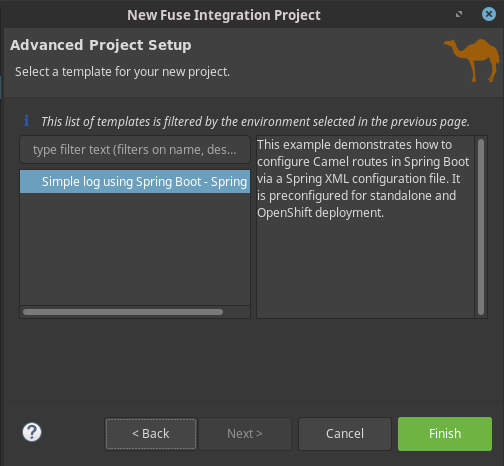
The project will be created for you. Here is a tree view of your project, which just includes a Spring Application class, and a camel-context.xml file which contains the Camel Context definition:
src └── main ├── fabric8 │ └── deployment.yml ├── java │ └── org │ └── mycompany │ └── Application.java └── resources ├── application.properties ├── logback.xml └── spring └── camel-context.xml
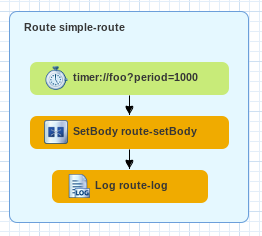
Here is the view of your Route, using the Designer:
The only change I needed to apply to the pom.xml is related to the fabric8 Maven plugin. As a matter of fact, with the version of fabric8 plugin included in the project, I’m facing the following error:
[ERROR] Failed to execute goal org.jboss.redhat-fuse:fabric8-maven-plugin:7.4.0.fuse-740036-redhat-00002:build (default) on project fuse-spring-boot: Failed to execute the build: Unable to build the image using the OpenShift build service: OpenShift Build fuse-spring-boot-s2i-1: Failed: GenericBuildFailed -> [Help 1]
Just switch the plugin, contained in the openshift profile, to the following one:
<profile> <id>openshift</id> <build> <plugins> <plugin> <groupId>io.fabric8</groupId> <artifactId>fabric8-maven-plugin</artifactId> <version>4.4.1</version> <executions> <execution> <goals> <goal>resource</goal> <goal>build</goal> </goals> </execution> </executions> </plugin> </plugins> </build> </profile> In order to deploy it on OpenShift, create a new OpenShift namespace for it:
oc new-project test -Popenshift Now, from the directory of your Fuse project, use the fabric8 plugin to deploy the Fuse project:
mvn fabric8:deploy In a matter of minutes your project will be available. Check the availability of its Pod:
oc get pods NAME READY STATUS RESTARTS AGE fuse74-spring-boot 1/1 Running 0 1m If you inspect the logs of your Project, you will see that the Route has been activated, as soon as the Pod has been started:
16:47:33.328 [main] INFO o.s.b.c.e.t.TomcatEmbeddedServletContainer - Tomcat started on port(s): 8080 (http) 16:47:33.332 [main] INFO org.mycompany.Application - Started Application in 5.807 seconds (JVM running for 6.197) 16:47:34.287 [Camel (MyCamel) thread #2 - timer://foo] INFO simple-route - >>> Hello World from camel-context.xml 16:47:35.270 [Camel (MyCamel) thread #2 - timer://foo] INFO simple-route - >>> Hello World from camel-context.xml 16:47:36.269 [Camel (MyCamel) thread #2 - timer://foo] INFO simple-route - >>> Hello World from camel-context.xml 16:47:37.269 [Camel (MyCamel) thread #2 - timer://foo] INFO simple-route - >>> Hello World from camel-context.xml
Congratulations, you have just managed to run your first Fuse 7 application on the top of OpenShift!
Found the article helpful? if so please follow us on Socials


