In this tutorial, we will learn how to map your Data Transfer Objects (DTO) using the MapStruct framework and integrate it into a Jakarta EE application.
Understanding DTO Objects
DTO Objects are used to decouple the database model from the view that is transferred to the client. They are intended to be immutable objects, used only at the transport layer, and thus a Java Record is a perfect fit for this purpose.
There are several strategies to map your model with DTOs. You can either add a transformation layer in your application or use a framework that does it for you with simple annotations. MapStruct is an excellent option for this purpose, as it requires only a mapping file to keep the two layers in sync.
Creating the DTO and Entity
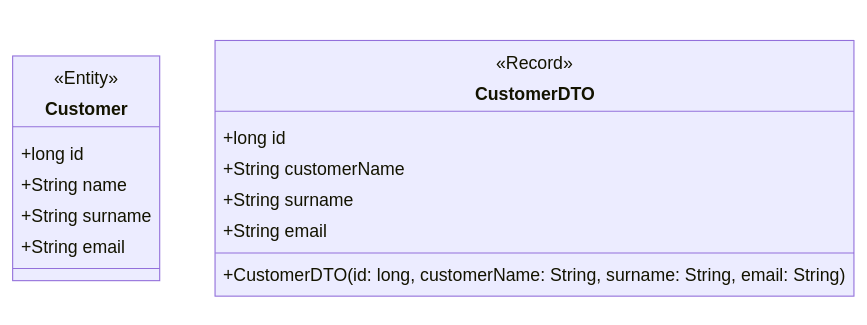
Let’s begin with the DTO, defined as a Java Record:
public record CustomerDTO(long id, String customerName, String surname, String email) {}
This DTO maps to the following Customer entity. Note that we have intentionally named the field “customerName” differently from “name” to demonstrate mapping different field names:
@Entity
public class Customer {
    @Id
    @GeneratedValue(strategy = GenerationType.IDENTITY)
    private long id;

    private String name;
    private String surname;
    private String email;

    public Customer() {}
    // Getters/Setters removed for brevity
}
Here is an overview of the two structures:
Setting Up MapStruct
To use MapStruct, include the following dependencies in your project:
<dependency>
    <groupId>org.mapstruct</groupId>
    <artifactId>mapstruct</artifactId>
    <version>1.5.5.Final</version>
</dependency>
<dependency>
    <groupId>org.mapstruct</groupId>
    <artifactId>mapstruct-processor</artifactId>
    <version>1.5.5.Final</version>
    <scope>provided</scope>
</dependency>
Additionally, configure the Maven compiler to process the MapStruct annotations:
<plugin>
    <groupId>org.apache.maven.plugins</groupId>
    <artifactId>maven-compiler-plugin</artifactId>
    <version>3.8.1</version>
    <configuration>
        <source>17</source>
        <target>17</target>
        <annotationProcessorPaths>
            <path>
                <groupId>org.mapstruct</groupId>
                <artifactId>mapstruct-processor</artifactId>
                <version>1.5.5.Final</version>
            </path>
        </annotationProcessorPaths>
    </configuration>
</plugin>
Defining the Mapper
With the configuration in place, we can define the mapper to convert between Customer and CustomerDTO:
import org.mapstruct.Mapper;
import org.mapstruct.Mapping;

@Mapper(componentModel = "spring")
public interface CustomerMapper {

    @Mapping(source = "name", target = "customerName")
    CustomerDTO toDTO(Customer customer);

    @Mapping(source = "customerName", target = "name")
    Customer toEntity(CustomerDTO customerDTO);
}
The interface uses the @Mapping annotation to convert the field “name” to “customerName” and vice versa. If the fields had the same name, the mapper could be simplified:
@Mapper(componentModel = "spring")
public interface CustomerMapper {
    CustomerDTO toDTO(Customer customer);
    Customer toEntity(CustomerDTO customerDTO);
}
Using the Mapper in Your Services
With the mapper in place, you can now convert the DTO to the model and vice versa in your services. Here’s an example:
@ApplicationScoped
public class CustomerService {

    @Inject
    private CustomerRepository repository;

    @Inject
    private CustomerMapper mapper;

    public List<CustomerDTO> findAll() {
        return repository.findAll().stream()
                .map(mapper::toDTO)
                .collect(Collectors.toList());
    }

    public CustomerDTO findById(Long id) {
        return repository.findById(id)
                .map(mapper::toDTO)
                .orElseThrow(() -> new WebApplicationException("Customer not found", Response.Status.NOT_FOUND));
    }

    public CustomerDTO create(CustomerDTO customerDTO) {
        Customer customer = mapper.toEntity(customerDTO);
        repository.save(customer);
        return mapper.toDTO(customer);
    }

    public CustomerDTO update(CustomerDTO customerDTO, Long id) {
        Customer existingCustomer = repository.findById(id)
                .orElseThrow(() -> new WebApplicationException("Customer not found", Response.Status.NOT_FOUND));

        existingCustomer.setName(customerDTO.customerName());
        existingCustomer.setSurname(customerDTO.surname());
        existingCustomer.setEmail(customerDTO.email());

        repository.save(existingCustomer);
        return mapper.toDTO(existingCustomer);
    }

    public void delete(Long id) {
        repository.deleteById(id);
    }
}
Exposing the DTO Objects via REST Endpoint
Finally, we will expose the DTO objects through a REST endpoint:
@RequestScoped
@Path("/demo")
@Produces(MediaType.APPLICATION_JSON)
@Consumes(MediaType.APPLICATION_JSON)
public class DemoController {

    @Inject
    private CustomerService customerService;

    @GET
    @Path("/list")
    public List<CustomerDTO> findAll() {
        return customerService.findAll();
    }

    @GET
    @Path("/id")
    public Response findById(@QueryParam("id") Long id) {
        CustomerDTO customerDTO = customerService.findById(id);
        return Response.ok(customerDTO).build();
    }

    @POST
    @Path("/add")
    public Response create(CustomerDTO customerDTO) {
        CustomerDTO createdCustomer = customerService.create(customerDTO);
        return Response.status(Response.Status.CREATED).entity(createdCustomer).build();
    }

    @PUT
    @Path("/modify")
    public Response update(CustomerDTO customerDTO, @QueryParam("id") Long id) {
        CustomerDTO updatedCustomer = customerService.update(customerDTO, id);
        return Response.ok(updatedCustomer).build();
    }

    @DELETE
    @Path("/delete")
    public Response delete(@QueryParam("id") Long id) {
        customerService.delete(id);
        return Response.ok().build();
    }
}
Conclusion
In this tutorial, we provided a comprehensive overview of how to map Data Transfer Objects to models and vice versa, using MapStruct to separate the two layers. This approach simplifies the process and maintains clear separation between your database models and the data transferred to clients, enhancing both maintainability and scalability of your application.
By following these steps, you can efficiently manage DTO mappings in a Jakarta EE application, leveraging the powerful features of MapStruct.