In modern WildFly and JBoss EAP versions, transaction timeout management remains an essential part of tuning enterprise applications to handle long-running operations gracefully. While the default timeout of 300 seconds works for most scenarios, microservices, cloud-native deployments, and Jakarta EE applications often require fine-tuned transaction settings to align with modern distributed architectures. Adjusting transaction timeouts can help prevent unnecessary rollbacks, optimize resource usage, and avoid stuck threads in high-load environments.
Configuring Transaction timeout in the transactions subsystem
Out of box, the transactions subsystem does not show the default value of the JTA transaction timeout. For example, here the transaction subsystem of WildFly 36:
<subsystem xmlns="urn:jboss:domain:transactions:6.0">
    <core-environment node-identifier="${jboss.tx.node.id:1}">
        <process-id>
            <uuid/>
        </process-id>
    </core-environment>
    <recovery-environment socket-binding="txn-recovery-environment" status-socket-binding="txn-status-manager"/>
    <coordinator-environment statistics-enabled="${wildfly.transactions.statistics-enabled:${wildfly.statistics-enabled:false}}"/>
    <object-store path="tx-object-store" relative-to="jboss.server.data.dir"/>
</subsystem>
The value of default-timeout can be configured through the coordinator-environment element as follows:
<coordinator-environment default-timeout="300"/>
Here is how tou can increase the default transaction timeout with the CLI:
/subsystem=transactions:write-attribute(name=default-timeout,value=400)
{"outcome" => "success"}
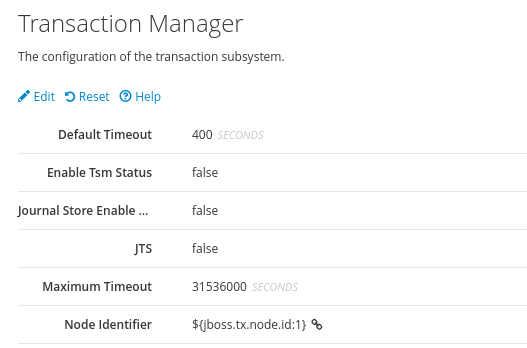
Here is the Transaction timeout setting, as you can see it from the Web Console:
Alternative Approaches to Transaction Timeout Management
Besides changing the global transaction timeout, you can set transaction timeouts programmatically using UserTransaction.setTransactionTimeout() within your application code for specific transactions only, reducing the risk of masking performance issues globally.
Additionally, if you are using Jakarta EE with WildFly, consider leveraging MicroProfile Fault Tolerance with timeout and retry policies for fine-grained control, especially in cloud-native deployments where transactions should align with microservice resilience strategies.
Finally, for advanced cases, you may integrate Narayana LRA (Long Running Actions) with WildFly to handle transactions exceeding traditional XA limits in a more scalable and cloud-friendly way. Here’s an article which discusses it in detai: MicroProfile LRA: A Comprehensive Guide
Configuring the Transaction Timeout in EJBs
Finally, you can set the transaction timeout for a specific EJB with the @org.jboss.ejb3.annotation.TransactionTimeout annotation:
import java.util.concurrent.TimeUnit;
import org.jboss.ejb3.annotation.TransactionTimeout;

@Stateless
public class SampleBean
{

  @TransactionTimeout(value = 30, unit = TimeUnit.SECONDS)
  public String doSomething() throws RuntimeException
  {
    //
  }
}
For Bean Managed Transactions, you can use the method setTransactionTimeout of the UserTransaction interface to set the timeout:
public void doSomething() {
    try {
        ut.setTransactionTimeout(600); // 10 minutes
        ut.begin();
Finally, you can also use the jboss-ejb3.xml descriptor to set the transaction timeout:
<jboss:ejb-jar xmlns:jboss="http://www.jboss.com/xml/ns/javaee"
               xmlns="http://java.sun.com/xml/ns/javaee"
               xmlns:tx="urn:trans-timeout"
               xmlns:xsi="http://www.w3.org/2001/XMLSchema-instance"
               xsi:schemaLocation="http://www.jboss.com/xml/ns/javaee http://www.jboss.org/j2ee/schema/jboss-ejb3-2_0.xsd
http://java.sun.com/xml/ns/javaee http://java.sun.com/xml/ns/javaee/ejb-jar_3_1.xsd
urn:trans-timeout http://www.jboss.org/j2ee/schema/trans-timeout-1_0.xsd"
               version="3.1"
               impl-version="2.0">
    <enterprise-beans>
        <session>
            <ejb-name>SampleBean</ejb-name>
            <ejb-class>com.acme.SampleBean</ejb-class>
            <session-type>Stateless</session-type>
        </session>
    </enterprise-beans>
    <assembly-descriptor>
        <container-transaction>
            <method>
                <ejb-name>SampleBean</ejb-name>
                <method-name>*</method-name>
                <method-intf>Local</method-intf>
            </method>
            <tx:trans-timeout>
                <tx:timeout>30</tx:timeout>
                <tx:unit>Seconds</tx:unit>
            </tx:trans-timeout>
        </container-transaction>
    </assembly-descriptor>
</jboss:ejb-jar>
On the other hand, if you are using Message Driven Beans, you can set the transactionTimeout as ActivationConfigProperty of your MDB:
@MessageDriven(name = "TestMDB", activationConfig = {
        @ActivationConfigProperty(propertyName = "destinationType", propertyValue = "javax.jms.Queue"),
        @ActivationConfigProperty(propertyName = "destination", propertyValue = "testQueue"),
        @ActivationConfigProperty(propertyName = "transactionTimeout", propertyValue="4")
        })
Transaction Timeout order
What happens when you have multiple points when a transaction timeout can happen? there is no hierarchy in this regards. Simply put, the first scope where a timeout happens that will cause the failure of a transaction.
Typically, the subsystem transaction timeout should be large enough to cover all application cases such as EJB Transaction timeouts.
Conclusion
In conclusion, configuring the transaction timeout in WildFly is a straightforward process that can be done by modifying the default-timeout attribute in the coordinator-environment element of the transactions subsystem in the standalone.xml configuration file. By increasing the transaction timeout, you can allow longer-running transactions to complete successfully, while still preventing transactions from taking too long and potentially causing resource contention or deadlocks.
if you want to know more details about configuring the Transactions using a JDBC Store instead of the default file store we recommend checking this article: How to configure a JDBC Store for Transactions