When building high-performance Java applications on WildFly, one often-overlooked bottleneck is logging. Logging operations, especially those involving I/O (e.g., writing to disk), can slow down your application’s main processing threads. This is where the Async Handler in WildFly’s logging subsystem comes into play.
🧠 What Is the Async Handler?
The Async Handler is a special logging handler in WildFly designed to decouple logging operations from the main application threads. Instead of writing logs directly (which may involve expensive I/O), WildFly enqueues log messages into an in-memory buffer (a queue). A separate thread processes this queue and delegates the log messages to one or more target (or delegate) handlers (e.g., a file handler).
Key Benefit:
The main thread returns immediately after enqueuing the log message—no blocking on file or console I/O.
⚙️ How It Works
- Application logs something (e.g.,
logger.info("Processed request")) - The log record is queued into the Async Handler.
- A dedicated thread flushes records from the queue to the delegate handler(s) (e.g., file or console).
- If the queue is full, behavior depends on the
overflow-actionsetting.
🔁 Overflow Behavior
If the queue is full, you can configure one of two behaviors via the overflow-action:
BLOCK→ The main thread waits for space in the queue.DISCARD→ The new log message is silently dropped.
Using BLOCK may defeat the purpose of using Async if the queue is too small or if the delegate handler is slow (e.g., writing to a slow disk).
📏 Choosing the Queue Length
There is no one-size-fits-all queue length. Some Red Hat examples use 512 or 1024, often powers of two due to memory allocation optimizations in many queue implementations. However, the ideal value depends on:
- Logging throughput (e.g., 250,000 logs/hour ≈ 70 logs/sec)
- Delegate handler speed
- Available memory
🛑 Very large queue sizes can increase memory usage (risk of OOM), especially under bursty workloads.
Recommendation: Start with 1024 or 2048, monitor queue saturation and GC pressure, and tune accordingly.
🛠️ How to Configure an Async Handler (CLI)
Here’s how to create and attach an async handler via the WildFly CLI:
# Connect to WildFly CLI
/bin/jboss-cli.sh --connect

# Step 1: Create a file handler
/subsystem=logging/file-handler=FILE2:add(file={"path"=>"myapp.log"}, level=INFO)

# Step 2: Create an async handler with a delegate to the file handler
/subsystem=logging/async-handler=ASYNC:add(queue-length=1024, overflow-action=block, level=INFO, subhandlers=["FILE2"])

# Step 3: Attach the async handler to the root logger
/subsystem=logging/root-logger=ROOT:add-handler(name=ASYNC)
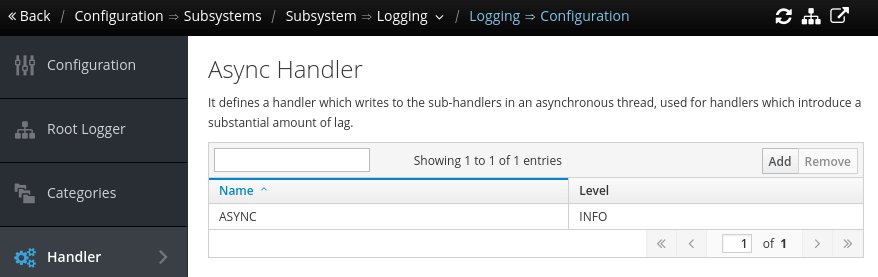
Here is the Async Handler view from the Web Console:
Final Notes
- Test under realistic load: simulate production logging rates to tune your configuration.
- Monitor the queue: although not visible via standard metrics, queue overflows or delays can often be inferred from missing or delayed logs.
- Consider asynchronous logging frameworks (e.g., Log4j2 AsyncAppender) if logging is critical in your architecture.
By using the Async Handler effectively, you can improve application responsiveness and prevent slow log I/O from affecting your business logic execution.