This article will teach you how to gracefully shut-down a Spring Boot application using the Actuator endpoints. We will also show how to configure a minimal security layer to protect access to this resource.
Configuring Spring Boot dependencies
Firstly, build a Spring Boot project which includes the following dependencies:
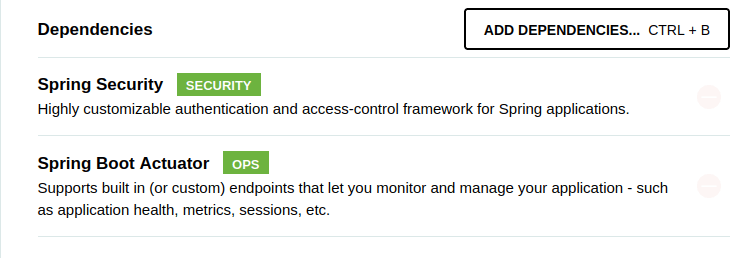
Within the project, you will now find the following Spring Boot starters:
<dependency>
    <groupId>org.springframework.boot</groupId>
    <artifactId>spring-boot-starter-actuator</artifactId>
</dependency>
<dependency>
    <groupId>org.springframework.boot</groupId>
    <artifactId>spring-boot-starter-security</artifactId>
</dependency>
If you are new to Spring Boot Actuator, you might find useful the following article: Spring Boot 3 Actuator Essentials
Configuring application properties
Next, we we need to enable the shutdown endpoint. We will also expose all available Actuator Endpoints:
management.endpoint.shutdown.enabled=true
management.endpoint.info.enabled=true
management.endpoints.web.exposure.include=*
Adding the Security Configuration Class
Finally, we need a Class to handle the Authentication.
import org.springframework.context.annotation.Configuration;
import org.springframework.security.config.annotation.authentication.builders.AuthenticationManagerBuilder;
import org.springframework.security.config.annotation.web.builders.HttpSecurity;
import org.springframework.security.config.annotation.web.configuration.WebSecurityConfigurerAdapter;
@Configuration
public class SpringSecurityConfig extends WebSecurityConfigurerAdapter {

    @Override
    protected void configure(HttpSecurity http) throws Exception {
        http
    .csrf().disable()
    .authorizeRequests().anyRequest().authenticated()
    .and()
    .httpBasic();
    }

    @Override
    protected void configure(AuthenticationManagerBuilder auth) throws Exception {
        auth.inMemoryAuthentication()
        .withUser("admin").password("{noop}password").roles("USER");
    }

}
Testing application shutdown
With our Classes and Configuration in place, we can now test the shutdown of our Spring Boot application using the Actuator /shutdown endpoint.
mvn install spring-boot:run
Next, shutdown the application as follows:
$ curl -i -X POST http://localhost:8080/actuator/shutdown -u admin:password

{"message":"Shutting down, bye..."}
How to capture the Shutdown of a Spring Boot application
There are several ways to capture the Shutdown of your Spring Boot application. For example, this annotation ensures that the destroy method is called when the application context is closed.
import jakarta.annotation.PreDestroy;
import org.springframework.stereotype.Component;

@Component
public class ShutdownBean {
    @PreDestroy
    public void destroy() {
        System.out.println(
                "Callback triggered - @PreDestroy.");
    }
}
You can also implement the DisposableBean Interface: This interface provides a destroy method that you can override to perform any cleanup tasks:
import org.springframework.beans.factory.DisposableBean;
import org.springframework.stereotype.Component;

@Component
public class ShutdownBean implements DisposableBean {
    @Override
    public void destroy() {
        System.out.println("Callback triggered - DisposableBean.");
    }
}
Finally, you can use the @EventListener for ContextClosedEvent: This approach allows you to listen for the ContextClosedEvent and perform actions when the application context is closed.
import org.springframework.context.event.ContextClosedEvent;
import org.springframework.context.event.EventListener;
import org.springframework.stereotype.Component;

@Component
public class ShutdownBean {
    @EventListener
    public void onContextClosed(ContextClosedEvent event) {
        System.out.println("Callback triggered - ContextClosedEvent.");
    }
}
Each of these methods has its own advantages. The @PreDestroy annotation is straightforward and easy to use, while the DisposableBean interface and @EventListener provide more flexibility and integration with Spring’s lifecycle management.
Conclusion
This article discussed how to gracefully shutdown a Spring Boot application using the Actuator and the Security Starter. You can find the application source code here: https://github.com/fmarchioni/masterspringboot/tree/master/security/shutdown
Found the article helpful? if so please follow us on Socials


