In this tutorial, we’ll walk through setting up a Spring Boot 3 application to use TestContainers for integration testing with PostgreSQL. TestContainers provides lightweight, disposable instances of databases and other services, which are essential for reliable and reproducible integration tests.
Prerequisites
Before you begin, ensure you have the following installed:
- Java 17 or higher
- Maven or Gradle
- Docker
Finally, if you are new to TestContainers, we recommend checking this TestContainer tutorial.
Step 1: Add Dependencies
First, add the necessary dependencies to your pom.xml (for Maven) or build.gradle (for Gradle) file.
<dependencies>
	<dependency>
		<groupId>org.springframework.boot</groupId>
		<artifactId>spring-boot-starter-data-jpa</artifactId>
	</dependency>
	<dependency>
		<groupId>org.springframework.boot</groupId>
		<artifactId>spring-boot-starter-web</artifactId>
	</dependency>

	<dependency>
		<groupId>org.testcontainers</groupId>
		<artifactId>testcontainers</artifactId>
		<scope>test</scope>
	</dependency>
	<dependency>
		<groupId>org.testcontainers</groupId>
		<artifactId>postgresql</artifactId>
		<scope>test</scope>
	</dependency>

	<dependency>
		<groupId>org.postgresql</groupId>
		<artifactId>postgresql</artifactId>
		<scope>runtime</scope>
	</dependency>

	<dependency>
		<groupId>org.springframework.boot</groupId>
		<artifactId>spring-boot-starter-test</artifactId>
		<scope>test</scope>
	</dependency>
</dependencies>
Step 2: Create the Integration Test
In this example, we will not cover the base project structure which includes the Model, Controller and Repository Classes. You will find all the project elements in the github project, at the end of the article.
Next, create the CustomerServiceIntegrationTest class to test your Spring Boot application with Testcontainers.
package com.example.demo;

import org.junit.jupiter.api.AfterAll;
import org.junit.jupiter.api.BeforeAll;
import org.junit.jupiter.api.Test;
import org.springframework.beans.factory.annotation.Autowired;
import org.springframework.boot.test.context.SpringBootTest;
import org.springframework.boot.test.web.server.LocalServerPort;
import org.springframework.test.context.DynamicPropertyRegistry;
import org.springframework.test.context.DynamicPropertySource;
import org.testcontainers.containers.PostgreSQLContainer;

import javax.transaction.Transactional;
import java.util.List;

import static org.junit.jupiter.api.Assertions.*;

@SpringBootTest(webEnvironment = SpringBootTest.WebEnvironment.RANDOM_PORT)
@Transactional
public class CustomerServiceIntegrationTest {

    @Autowired
    private CustomerRepository customerRepository;

    @LocalServerPort
    private Integer port;

    static PostgreSQLContainer<?> postgres = new PostgreSQLContainer<>("postgres:16-alpine");

    @BeforeAll
    static void beforeAll() {
        postgres.start();
    }

    @AfterAll
    static void afterAll() {
        postgres.stop();
    }

    @DynamicPropertySource
    static void configureProperties(DynamicPropertyRegistry registry) {
        registry.add("spring.datasource.url", postgres::getJdbcUrl);
        registry.add("spring.datasource.username", postgres::getUsername);
        registry.add("spring.datasource.password", postgres::getPassword);
    }

    @Test
    void testFindAll() {
        Customer customer1 = new Customer("John", "Doe", "[email protected]");
        Customer customer2 = new Customer("Jane", "Doe", "[email protected]");
        customerRepository.save(customer1);
        customerRepository.save(customer2);

        List<Customer> list = customerRepository.findAll();
        assertNotNull(list, "The list of customers should not be null");
        assertEquals(2, list.size(), "The list should contain exactly 2 customers");

        assertTrue(list.stream().anyMatch(customer -> "John".equals(customer.getFirstName())),
                "The list should contain a customer with the first name 'John'");
        assertTrue(list.stream().anyMatch(customer -> "Jane".equals(customer.getFirstName())),
                "The list should contain a customer with the first name 'Jane'");
    }
}
Step 3: Explanation
- Annotations:
@SpringBootTest(webEnvironment = SpringBootTest.WebEnvironment.RANDOM_PORT): This annotation tells Spring Boot to start an embedded server on a random port during the test.@Transactional: This annotation ensures that each test method runs within a transaction that is rolled back at the end of the test, maintaining database state consistency.
- Testcontainers Setup:
PostgreSQLContainer<?> postgres = new PostgreSQLContainer<>("postgres:16-alpine"): This line creates a new PostgreSQL container using thepostgres:16-alpineDocker image.@BeforeAll: This method starts the PostgreSQL container before any tests run.@AfterAll: This method stops the PostgreSQL container after all tests have run.
- Dynamic Property Source:
@DynamicPropertySource: This annotation dynamically sets thespring.datasource.url,spring.datasource.username, andspring.datasource.passwordproperties to match the configuration of the running PostgreSQL container.
- Test Method:
- The
testFindAllmethod saves twoCustomerentities to the database and then retrieves them to verify that they were saved correctly.
- The
Step 4: Run the Test
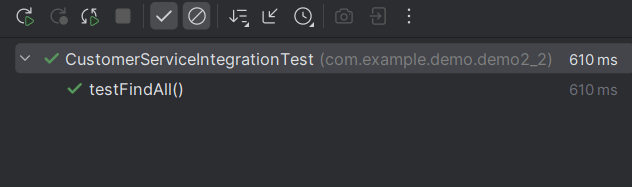
Run the test class using your IDE or a build tool like Maven or Gradle. The test will start a PostgreSQL container, set up the Spring Boot application to use it, and execute the test methods.
Conclusion
Using Testcontainers with PostgreSQL in your Spring Boot integration tests allows you to create isolated, repeatable, and reliable tests that run against a real PostgreSQL database. This approach ensures that your tests are more robust and closer to the production environment compared to using in-memory databases like H2.
Found the article helpful? if so please follow us on Socials


