This step-by-step guide will show you how to create a minimal Java LDAP Client to test the connection to an LDAP Server and show the LDAP tree using a graphical interface. We will use Docker to trigger a simple LDAP Server so you don’t need to install anything!
Step # 1 Start LDAP with Docker
There are several open source LDAP distributions. In this tutorial we will start openldap using the following Docker command:
docker run --rm --name my-ldap \
  --env LDAP_ORGANISATION="Example Org" \
  --env LDAP_DOMAIN="example.org" \
  --env LDAP_ADMIN_PASSWORD="admin" \
  --publish 389:389 \
  --detach osixia/openldap:1.5.0
Then, verify that LDAP is running on your localhost, forwarding traffic from the local port 389 to the container port 389:
docker ps
CONTAINER ID   IMAGE                   COMMAND                 CREATED             STATUS             PORTS                                            NAMES
f3e9384a0b1f   osixia/openldap:1.5.0   "/container/tool/run"   About an hour ago   Up About an hour   0.0.0.0:389->389/tcp, :::389->389/tcp, 636/tcp   my-ldap
Next, we need to insert some example users in it. For example, the following users.ldif will define two Users for the domain dc=example,dc=org:
dn: ou=users,dc=example,dc=org
objectClass: organizationalUnit
ou: users

dn: uid=jdoe,ou=users,dc=example,dc=org
objectClass: inetOrgPerson
cn: John Doe
sn: Doe
uid: jdoe
mail: [email protected]
userPassword: password123

dn: uid=asmith,ou=users,dc=example,dc=org
objectClass: inetOrgPerson
cn: Alice Smith
sn: Smith
uid: asmith
mail: [email protected]
userPassword: password123
Finally, you can load the LDIF file directly into the Docker container with:
docker exec -i my-ldap ldapadd -x -D "cn=admin,dc=example,dc=org" -w admin < users.ldif
That’s all. Let’s wrap a simple Java code as Client
Step #2 Writing the java LDAP Client
To code the Java Client we will use a simple set of libraries:
- The UnboundID LDAP SDK for Java is a fast, powerful, user-friendly, and completely free Java library for communicating with LDAP directory servers.
- Java Swing to display the LDAP tree
Finally, we will use JBang to bundle the dependencies. if you are new to JBang you can check this article: JBang: Create Java scripts like a pro
//DEPS com.unboundid:unboundid-ldapsdk:6.0.7

import com.unboundid.ldap.sdk.*;
import javax.swing.*;
import javax.swing.tree.*;
import java.awt.*;
import java.util.*;

public class ldaptree {

    public static void main(String[] args) throws Exception {
        // Connessione al server LDAP
        LDAPConnection connection = new LDAPConnection("localhost", 389, "cn=admin,dc=example,dc=org", "admin");

        String baseDN = "dc=example,dc=org";
        SearchResult result = connection.search(baseDN, SearchScope.SUB, "(objectClass=*)");

        // Crea la radice del JTree
        DefaultMutableTreeNode root = new DefaultMutableTreeNode(baseDN);

        // Mappa per costruire l'albero gerarchico
        Map<String, DefaultMutableTreeNode> nodeMap = new HashMap<>();
        nodeMap.put(baseDN, root);

        // Ordina DN in base alla profondità per evitare problemi di ordine
        result.getSearchEntries().stream()
            .sorted(Comparator.comparingInt(e -> e.getDN().split(",").length))
            .forEach(entry -> {
                String dn = entry.getDN();
                if (!dn.equalsIgnoreCase(baseDN)) {
                    try {
                        String parentDN = entry.getParentDNString();  // Aggiunto try-catch
                        DefaultMutableTreeNode parentNode = nodeMap.get(parentDN);
                        if (parentNode != null) {
                            DefaultMutableTreeNode newNode = new DefaultMutableTreeNode(dn);
                            parentNode.add(newNode);
                            nodeMap.put(dn, newNode);
                        }
                    } catch (LDAPException e) {
                        e.printStackTrace();  // Stampa l'errore
                    }
                }
            });

        // Costruzione interfaccia grafica
        SwingUtilities.invokeLater(() -> {
            JFrame frame = new JFrame("LDAP Tree Viewer");
            frame.setDefaultCloseOperation(JFrame.EXIT_ON_CLOSE);
            JTree tree = new JTree(root);
            JScrollPane scrollPane = new JScrollPane(tree);
            frame.add(scrollPane, BorderLayout.CENTER);
            frame.setSize(400, 500);
            frame.setVisible(true);
        });
    }
}
Alternatively, you can add the UnboundID LDAP SDK to the Classpath of your Java application.
Step #3 Test your application
You can run and test your LDAP Client as follows:
jbang ldaptree.java
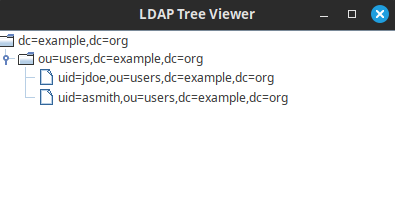
Here is the LDAP Client in action:
Conclusion
This article provided a step-by-step guide to connect to an LDAP Server from Java using a simple set of libraries available in UnboundID LDAP SDK for Java.