JBang is a tool that allows you to run Java applications as easily as scripting languages like Python or Node.js. You don’t need Maven or Gradle setup, just a single .java file with dependency annotations at the top. It’s ideal for:
- Prototyping Java web services
- Teaching Java quickly
- Running demos with zero project setup
- Exploring Spring Boot without boilerplate
Why Use JBang with Spring Boot?
Normally, Spring Boot apps require a pom.xml or build.gradle and a structured project layout. With JBang, you can:
- Write everything in one file
- Add dependencies inline with
//DEPS - Run it directly via the command line
This speeds up early development, sharing examples, and testing new ideas.
🔧 Prerequisites
- Java 17 or later
- JBang installed – Get it from jbang.dev
- Learn more about JBang from this article: JBang: Create Java scripts like a pro
🧪 Use Case: Simple Web Service for Power Calculation
Let’s walk through your single-file Spring Boot app that calculates the square of a number.
📄 MyApp.java (Single-file Spring Boot App)
Here is a single file that that declares JBang dependencies and Java 17 as version:
//usr/bin/env jbang "$0" "$@" ; exit $?
//JAVA 17
//DEPS org.springframework.boot:spring-boot-starter-web:3.4.4

package app;

import org.springframework.boot.SpringApplication;
import org.springframework.boot.autoconfigure.SpringBootApplication;
import org.springframework.web.bind.annotation.*;

@SpringBootApplication
@RestController
public class MyApp {

    public static void main(String[] args) {
        SpringApplication.run(MyApp.class, args);
    }

    @GetMapping("/")
    public String index() {
        return """
        <html>
        <head>
            <title>Power Calculator</title>
            <style>
                body { font-family: sans-serif; margin: 2em; }
                input, button { font-size: 1em; padding: 0.5em; }
                #result { margin-top: 1em; font-weight: bold; }
            </style>
        </head>
        <body>
            <h1>Calculate Power</h1>
            <input type="number" id="value" placeholder="Enter a number" />
            <button onclick="calculate()">Calculate</button>
            <div id="result"></div>
            <script>
                function calculate() {
                    const val = document.getElementById('value').value;
                    fetch('/calc?value=' + val)
                        .then(res => res.text())
                        .then(data => document.getElementById('result').textContent = data)
                        .catch(err => console.error(err));
                }
            </script>
        </body>
        </html>
        """;
    }

    @GetMapping("/calc")
    public String calc(@RequestParam double value) {
        double result = Math.pow(value, 2);
        return "Result: " + result;
    }
}
The application:
- Starts a Spring Boot server
- Serves a small HTML page at
/with a form - Calculates
value²using a REST endpoint at/calc
▶️ Running the App
Save the file as MyApp.java, then run:
jbang MyApp.java
After a few seconds, Spring Boot will start on http://localhost:8080.
🧠 What This App Does
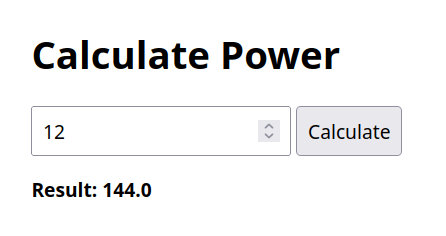
- When you visit
/, you get a webpage with a number input and button. - When you enter a value and click Calculate, the browser calls
/calc?value=.... - The server responds with the squared value.
✅ When to Use JBang for Spring Boot
- Prototypes: Quickly test a REST endpoint or HTML UI
- Classroom examples: Teach Spring Boot without setup overhead
- Demos and workshops: Share everything in a single Java file
- Scripting with Spring power: Combine the simplicity of scripts with Spring’s capabilities
Conclusion
Using JBang to run a Spring Boot application offers a powerful and streamlined way to prototype, test, or demonstrate Java-based web services—without the need for complex build tools or multi-file projects. This approach is especially useful for developers who want to quickly validate ideas, create shareable demos, or teach Spring concepts in a simplified environment. While it’s not a replacement for full-scale production setups, JBang provides an excellent bridge between simplicity and capability, letting you harness the power of Spring Boot in just a single .java file.