This guide shows how to integrate a lightweight AI assistant into a Java application running on WildFly. We’ll use the LangChain4j library to interact with a language model (like LLaMA via Ollama), and expose it through a simple HTML interface using Jakarta REST and CDI. No hype, no magic—just a working example.
Requirements
Before you begin, you need:
- Java 17+
- JBang installed (for running the app quickly) – a quickstart article is available here: JBang: Create Java scripts like a pro
- Ollama installed and running with a supported model like
llama3:3b– a quickstart article is available here: Getting started with langchain4j and Llama Model
Checking the AI Models
Firstly, to run the application, after that you have all the above stuff available, you need to provide the ollama version that is available on your machine. You can do that with a simple command:
ollama list
NAME                  ID              SIZE      MODIFIED
llama3.2:latest       a80c4f17acd5    2.0 GB    2 months ago
llama3.2:3b           a80c4f17acd5    2.0 GB    2 months ago
deepseek-r1:latest    0a8c26691023    4.7 GB    2 months ago
deepseek-r1:8b        28f8fd6cdc67    4.9 GB    2 months ago
In this example we will be using llama3.2:3b. Therefore, we will export this info in the OLLAMA_CHAT_MODEL_NAME variable.
The sample AI Application with WildFly
This Java class demonstrates a lightweight AI-powered web application built using Jakarta EE technologies and LangChain4j. It leverages Jakarta RESTful Web Services (JAX-RS) to expose HTTP endpoints and Jakarta CDI for dependency injection, enabling modular and testable components. The application is packaged and run using WildFly Glow, which simplifies bootstrapping a WildFly server via JBang, allowing rapid development without complex configuration.
If you are new to WildFly Glow we recommend checking this helpful article: WildFly Glow: Next-Gen Evolution in Provisioning
AI integration is handled through LangChain4j, a Java library that abstracts interactions with language models, here injected via CDI and configured to communicate with a model served by Ollama, such as llama3. Finally, the model contains a prompt within the application and returns responses that are directly embedded in HTML, making the application usable through a browser without additional frontend frameworks. Together, these technologies enable a functional and clean AI assistant web app entirely within the Java ecosystem.
// OLLAMA_CHAT_MODEL_NAME=llama3.2:3b jbang run --verbose myaiapp.java
///usr/bin/env jbang "$0" "$@" ; exit $?
//JAVA 17+
//DEPS org.wildfly.bom:wildfly-expansion:${wildfly.version:35.0.1.Final}@pom
//DEPS org.wildfly.glow:wildfly-glow:1.4.1.Final
//DEPS jakarta.ws.rs:jakarta.ws.rs-api
//DEPS jakarta.enterprise:jakarta.enterprise.cdi-api
//DEPS dev.langchain4j:langchain4j:1.0.0-alpha1
//GLOW --spaces=incubating --server-version=35.0.1.Final

import dev.langchain4j.model.chat.request.ChatRequest;
import dev.langchain4j.data.message.*;
import dev.langchain4j.model.chat.ChatLanguageModel;
import jakarta.enterprise.context.RequestScoped;
import jakarta.inject.*;
import jakarta.ws.rs.*;
import jakarta.ws.rs.core.*;

import java.util.Objects;

@ApplicationPath("/")
public class myaiapp extends Application {

    @Path("/")
    @RequestScoped
    public static class Index {

        @GET
        @Produces(MediaType.TEXT_HTML)
        public String form() {
            return """
                <html>
                <head>
                    <title>Word Assistant</title>
                    <style>
                        body { font-family: sans-serif; margin: 2em; }
                        input, button { padding: 0.5em; font-size: 1em; }
                        #result { margin-top: 1em; padding: 1em; border: 1px solid #ccc; background: #f9f9f9; }
                    </style>
                </head>
                <body>
                    <h1>Explain the meaning of a word in simple terms</h1>
                    <input type="text" id="word" placeholder="Enter a word" />
                    <button onclick="ask()">Ask</button>
                    <div id="result">Response will appear here...</div>

                    <script>
                        function ask() {
                            const word = document.getElementById('word').value;
                            if (!word) return;
                            fetch('/myaiapp/chat?word=' + encodeURIComponent(word))
                                .then(response => response.text())
                                .then(html => document.getElementById('result').innerHTML = html)
                                .catch(error => document.getElementById('result').textContent = 'Error: ' + error);
                        }
                    </script>
                </body>
                </html>
            """;
        }
    }

    @Path("/chat")
    @RequestScoped
    public static class Chat {

        @Inject
        @Named("ollama")
        ChatLanguageModel chatModel;

        @GET
        @Produces(MediaType.TEXT_HTML)
        public String chatWithAssistant(@QueryParam("word") String word) {
            if (word == null || word.isBlank()) {
                return "<p style='color:red;'>Please provide a word as query parameter <code>?word=...</code></p>";
            }

            try {
                return chatModel.chat(ChatRequest.builder().messages(
                        SystemMessage
                                .from("""
                                       You are a teacher that explains to kids the meaning of some words like you are speaking to a kid.
                                       Your response must be polite, use the same language as the question, and be relevant to the question.
                                       Your answer must be embedded in HTML.
                                    """),
                        UserMessage.from("Explain the meaning of the word " + word + " to a 10-year-old")).build())
                        .aiMessage().text();
            } catch (Exception e) {
                return "<p style='color:red;'>My failure reason is:<br><br>" + e.getMessage() + "</p>";
            }
        }
    }
}
How to run the application
Finally, you can run the above application as follows:
OLLAMA_CHAT_MODEL_NAME=llama3.2:3b jbang run --verbose myaiapp.java
Then, as soon as WildFly Glow assembles the libraries you need to run the example, you can reach the application from your browser with: http://localhost:8080/myapp :
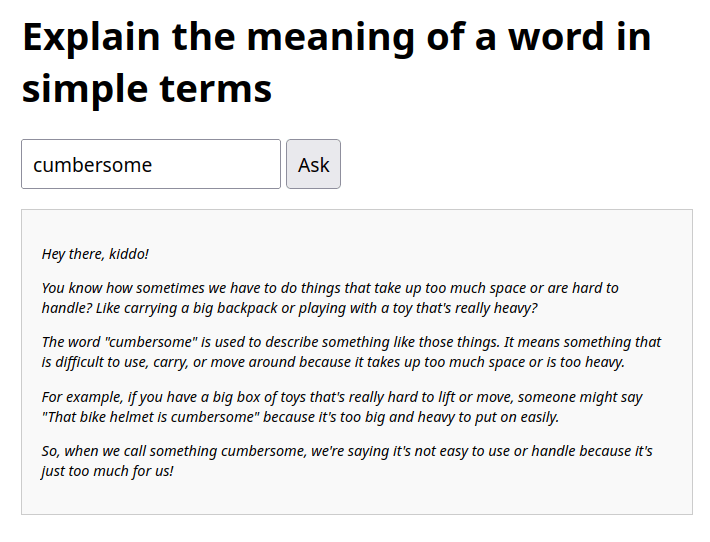
The following picture shows your AI application in action, assuming you are using the word “cumbersome” in your search:
Summary
This project demonstrates a minimal setup to:
- Deploy a Java app with WildFly using Jakarta REST
- Add conversational AI using LangChain4j
- Interact with a language model like LLaMA via Ollama
- Serve a web interface without external frameworks
It’s a practical base for experimenting with AI in Java, without heavy frameworks or complex infrastructure.