DeepSeek AI is a powerful AI model that can be integrated into Java applications using LangChain4j. This tutorial will guide you through setting up a simple chatbot in Java using DeepSeek AI and LangChain4j, leveraging the Ollama API for local execution.
DeepSeek AI Model Variants and Differences
Before we dive into an example on how to use DeepSeek AI from a Java application, let’s check the available model available. Firstly, DeepSeek offers multiple model variants, each tailored for different levels of performance and use cases. Below are some of the available versions:
- DeepSeek-R1 (8B, 7B, 4B, etc.)
- These models are optimized for general-purpose language understanding and are available in different sizes (8B, 7B, 4B, etc.), where “B” represents billions of parameters.
- Larger models (e.g., 8B) provide better accuracy but require more computational power.
- Smaller models (e.g., 4B) are more lightweight and suitable for resource-constrained environments.
- DeepSeek-Coder
- This variant is fine-tuned specifically for code generation and programming-related tasks.
- It supports multiple programming languages and provides accurate coding assistance, making it ideal for software developers.
- DeepSeek-Chat
- Optimized for conversational AI, it delivers a more human-like chat experience.
- It can maintain better context over extended interactions, making it useful for chatbots and virtual assistants.
Therefore, each DeepSeek AI model serves a distinct purpose, allowing developers to choose the one that best suits their application’s requirements.
Prerequisites
Firstly, ensure you have the following installed:
- Java 21 or later
- JBang (recommended for simpler bootstrap of the Java application. Check this article to learn more: JBang: Create Java scripts like a pro
- Ollama installed and running locally . Check this article to learn more: Getting started with langchain4j and Llama Model
- DeepSeek AI model pulled via Ollama:
ollama pull deepseek-r1:8b
Step 1: Create a Java Chatbot with DeepSeek AI
We will create a simple chatbot that interacts with the DeepSeek AI model using LangChain4j. The bot will accept user input continuously and respond in a conversational manner.
Java Code for DeepSeek AI Chatbot
Firstly, create a new JBang script (ChatDemo.java) and add the following code:
//JAVA 21
//DEPS dev.langchain4j:langchain4j:0.36.2
//DEPS dev.langchain4j:langchain4j-ollama:0.36.2
//DEPS org.slf4j:slf4j-simple:2.0.9

import java.time.Duration;
import java.util.Scanner;
import dev.langchain4j.chain.ConversationalChain;
import dev.langchain4j.memory.ChatMemory;
import dev.langchain4j.memory.chat.MessageWindowChatMemory;
import dev.langchain4j.model.chat.ChatLanguageModel;
import dev.langchain4j.model.ollama.OllamaChatModel;

public class ChatDemo {
    private static final String MODEL = "deepseek-r1:8b";
    private static final String BASE_URL = "http://localhost:11434";
    private static final Duration TIMEOUT = Duration.ofSeconds(120);

    public static void main(String[] args) {
        ChatLanguageModel model = OllamaChatModel.builder()
            .baseUrl(BASE_URL)
            .modelName(MODEL)
            .timeout(TIMEOUT)
            .build();

        ChatMemory chatMemory = MessageWindowChatMemory.withMaxMessages(20);
        ConversationalChain chain = ConversationalChain.builder()
            .chatLanguageModel(model)
            .chatMemory(chatMemory)
            .build();

        try (Scanner scanner = new Scanner(System.in)) {
            System.out.println("Start chatting with DeepSeek AI! (type 'exit' or 'quit' to stop)");

            while (true) {
                System.out.print("> ");
                String input = scanner.nextLine().trim();

                if (input.equalsIgnoreCase("exit") || input.equalsIgnoreCase("quit")) {
                    System.out.println("Exiting chat.");
                    break;
                }

                String response = chain.execute(input);
                System.out.println("AI: " + response);
            }
        }
    }
}
Explanation of the Code
- Dependencies:
LangChain4jfor AI interactionLangChain4j-Ollamafor running DeepSeek locallyslf4j-simpleto handle logging
- OllamaChatModel is used to communicate with DeepSeek AI running locally.
- ConversationalChain maintains chat history and provides responses.
- Scanner allows user interaction in a continuous loop until the user types
exit.
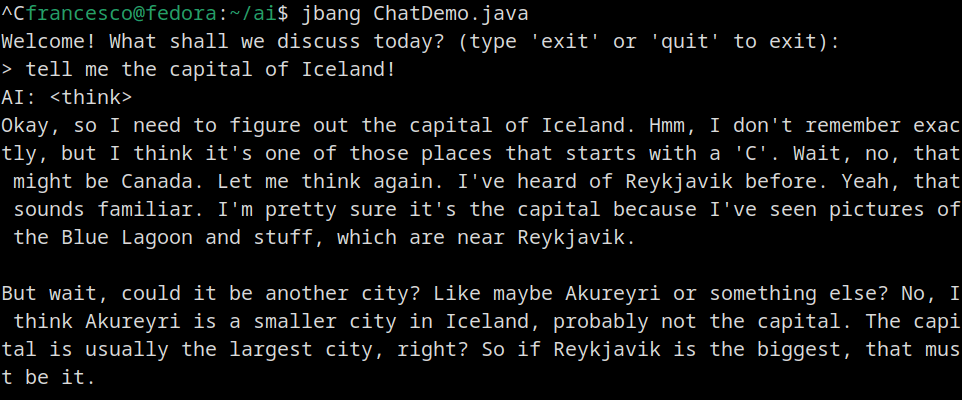
Step 2: Run the Chatbot
To execute the chatbot script using JBang, run:
jbang ChatDemo.java
Here is a sample session with DeekSeek:
Conclusion
In this tutorial, we successfully:
- Set up DeepSeek AI with Java and LangChain4j.
- Built a simple chatbot that maintains conversational history.
- Integrated Ollama for running the model locally.
- Explored the different DeepSeek AI model variants and their applications.
Your can further extend this setup for more advanced AI applications like automated assistants, text analysis, and more. 🚀