Introduction
When writing tests in Java, it’s important to verify that a method or code block behaves as expected. One of the most common things to check is whether an exception is thrown during the execution of a test. However, sometimes we also want to verify that no exception is thrown. This can be particularly important in situations where an exception could cause a critical failure or an unexpected behavior. In this tutorial, we’ll go through how to assert that no exception has been thrown in a JUnit test using both JUnit 4 and JUnit 5.
Asserting in JUnit 4
In JUnit 4, we can use the @Test annotation to mark a method as a test. To assert that no exception is thrown, we can use the @Test annotation’s expected attribute. Here’s an example:
import org.junit.Test;

public class MyTest {

    @Test(expected = NoException.class)
    public void testMethod() {
        // Code that should not throw an exception goes here
    }

}
In this example, we’re using the @Test annotation to mark the testMethod as a test. We’re also using the expected attribute to specify that we expect no exception to be thrown during the execution of testMethod. If an exception is thrown during the execution of testMethod, JUnit will mark the test as failed.
Asserting in JUnit 5
In JUnit 5, we can use the @Test annotation in a similar way as JUnit 4. However, instead of using the expected attribute, we can use the assertDoesNotThrow method from the Assertions class. Here’s an example:
import org.junit.jupiter.api.Test;
import static org.junit.jupiter.api.Assertions.assertDoesNotThrow;

public class MyTest {

    @Test
    public void testMethod() {
        assertDoesNotThrow(() -> {
            // Code that should not throw an exception goes here
        });
    }

}
In this example, we’re using the @Test annotation to mark the testMethod as a test. We’re also using the assertDoesNotThrow method to specify that we expect no exception to be thrown during the execution of the code block passed as a lambda to the assertDoesNotThrow method. If an exception is thrown during the execution of the code block, JUnit will mark the test as failed.
A Full JUnit 5 example
Finally, let’s see a complete example which shows how to assert that you don’t throw Exceptions in your code. Let’s begin from the base Class:
public class Calculator {
    public int divide(int dividend, int divisor) {
        if (divisor == 0) {
            throw new IllegalArgumentException("Divisor cannot be zero");
        }
        return dividend / divisor;
    }

    public int square(int number) {
        if (number < 0) {
            throw new IllegalArgumentException("Number cannot be negative");
        }
        return number * number;
    }

    public double sqrt(double number) {
        if (number < 0) {
            throw new ArithmeticException("Cannot take square root of negative number");
        }
        return Math.sqrt(number);
    }

    public int parse(String input) {
        try {
            return Integer.parseInt(input);
        } catch (NumberFormatException e) {
            throw new NumberFormatException("Invalid number format: " + input);
        }
    }
}
As you can see, the above Class can throw multiple Exceptions in the Calculator methods. Let’s write a JUnit 5 Test class which you can use to validate the single operations:
import org.junit.jupiter.api.Test;
import static org.junit.jupiter.api.Assertions.*;

public class CalculatorTest {

    Calculator calculator = new Calculator();

    @Test
    void testDivide_NoException() {
        assertDoesNotThrow(() -> calculator.divide(10, 2));
    }

    @Test
    void testSquare_NoException() {
        assertDoesNotThrow(() -> calculator.square(5));
    }

    @Test
    void testSqrt_NoException() {
        assertDoesNotThrow(() -> calculator.sqrt(25.0));
    }

    @Test
    void testParse_NoException() {
        assertDoesNotThrow(() -> calculator.parse("123"));
    }
}
Then, run it from the command line or your IDE:
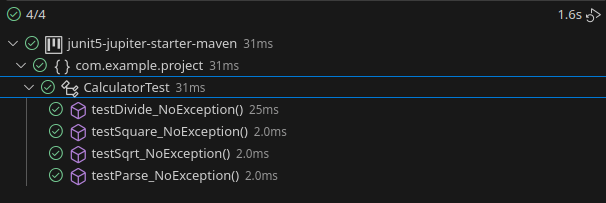
Asserting multiple Exceptions
Finally, it is worth mentioning that you can also manage multiple assertions in a single Test. For example:
    @Test
    void testMultipleMethods_NoException() {
        assertAll("All methods should execute without throwing exceptions",
            () -> assertDoesNotThrow(() -> calculator.divide(20, 5), "divide() threw an exception"),
            () -> assertDoesNotThrow(() -> calculator.square(4), "square() threw an exception"),
            () -> assertDoesNotThrow(() -> calculator.sqrt(16.0), "sqrt() threw an exception"),
            () -> assertDoesNotThrow(() -> calculator.parse("42"), "parse() threw an exception")
        );
    }
Conclusion
Asserting that no exception is thrown during the execution of a test can be important for ensuring that a method or code block behaves as expected. In JUnit 4, we can use the @Test annotation’s expected attribute to specify that we expect no exception to be thrown. In JUnit 5, we can use the assertDoesNotThrow method from the Assertions class to achieve the same result. Remember to test your code thoroughly to ensure that it behaves as expected in all situations.
Source code for this tutorial is available here: https://github.com/fmarchioni/mastertheboss/tree/master/test/junit5-assert-noexception